
1. OOP Basics#
1.1. Learning Objectives#
Provide some concepts of object oriented programming in Python and examples.
1.2. Python OOP Basics#
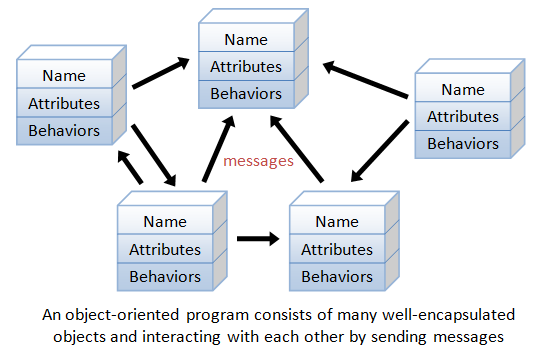
Object-oriented programming is a programming paradigm that provides a means of structuring programs so that properties and behaviors are bundled into individual objects.
OOP models real-world entities as software objects that have some data associated with them and can perform certain operations. OOP simplifies modeling real-world concepts in your programs and enables you to build systems that are more reusable and scalable.
Object-oriented programming (OOP) in Python helps you structure your code by grouping related data and behaviors into objects. You start by defining classes, which act as blueprints, and then create objects from them.
The four pillars of OOP are:
Encapsulation allows you to bundle data (attributes) and behaviors (methods) within a class to create a cohesive unit. By defining methods to control access to attributes and its modification, encapsulation helps maintain data integrity and promotes modular, secure code.
Inheritance enables the creation of hierarchical relationships between classes, allowing a subclass to inherit attributes and methods from a parent class. This promotes code reuse and reduces duplication.
Abstraction focuses on hiding implementation details and exposing only the essential functionality of an object. By enforcing a consistent interface, abstraction simplifies interactions with objects, allowing developers to focus on what an object does rather than how it achieves its functionality.
Polymorphism allows you to treat objects of different types as instances of the same base type, as long as they implement a common interface or behavior. Python’s duck typing make it especially suited for polymorphism, as it allows you to access attributes and methods on objects without needing to worry about their actual class.
A class is a blueprint (or template) of entities (things) of the same kind. An instance is a particular realization of a class.
Python supports both class objects and instance objects. In fact, everything in Python is object, including class object.
An object contains attributes: data attributes (or static attribute or variables) and dynamic behaviors called methods. In UML diagram, objects are represented by 3-compartment boxes: name, data attributes and methods, as shown below:
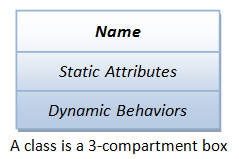
To access an attribute, use “dot” operator in the form of class_name.attr_name or instance_name.attr_name_.
To construct an instance of a class, invoke the constructor in the form of instance_name = class_name(_args_).
1.2.1. Class Definition Syntax#
The syntax is:
class class_name(superclass_1, ...):
    """Class doc-string"""

    class_var_1 = value_1  # Class variables
    ......

    def __init__(self, arg_1, ...):
        """Initializer"""
        self.instance_var_1 = arg_1  # Attach instance variables by assignment
        ......

    def __str__(self):
        """For printf() and str()"""
        ......

    def __repr__(self):
        """For repr() and interactive prompt"""
        ......

    def method_name(self, *args, **kwargs):
        """Method doc-string"""
        ......
1.2.2. Polymorphism#
Polymorphism in OOP is the ability to present the same interface for differing underlying implementations. For example, a polymorphic function can be applied to arguments of different types, and it behaves differently depending on the type of the arguments to which they are applied.
Python is implicitly polymorphic, as type are associated with objects instead of variable references.
1.2.3. Example 1: Getting Started with a Circle class#
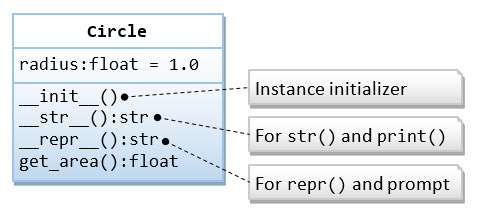
Write a module called circle (to be saved as circle.py), which contains a Circle class. The Circle class shall
contain a data attribute radius and a method get_area(), as shown in the following class diagram.
"""
circle.py: The circle module, which defines a Circle class.
"""
from math import pi

class Circle:
    """A Circle instance models a circle with a radius"""

    def __init__(self, radius=1.0):
        """Constructor with default radius of 1.0"""
        self.radius = radius  # Create an instance variable radius

    def __str__(self):
        """Return a descriptive string for this instance, invoked by print() and str()"""
        return 'This is a circle with radius of %.2f' % self.radius

    def __repr__(self):
        """Return a command string that can be used to re-create this instance, invoked by repr()"""
        return 'Circle(radius=%f)' % self.radius

    def get_area(self):
        """Return the area of this Circle instance"""
        return self.radius * self.radius * pi

# For Testing under Python interpreter
# If this module is run under Python interpreter, __name__ is '__main__'.
# If this module is imported into another module, __name__ is 'circle'
# (the module name).
if __name__ == '__main__':
    c1 = Circle(2.1)      # Construct an instance
    print(c1)             # Invoke __str__()
    print(c1.get_area())

    c2 = Circle()         # Default radius
    print(c2)
    print(c2.get_area())  # Invoke member method

    c2.color = 'red'  # Create a new attribute for this instance via assignment
    print(c2.color)
    #print(c1.color)  # Error - c1 has no attribute color

    # Test doc-strings
    print(__doc__)                  # This module
    print(Circle.__doc__)           # Circle class
    print(Circle.get_area.__doc__)  # get_area() method

    print(isinstance(c1, Circle)) # True
    print(isinstance(c2, Circle)) # True
    print(isinstance(c1, str))    # False
This is a circle with radius of 2.10
13.854423602330987
This is a circle with radius of 1.00
3.141592653589793
red

circle.py: The circle module, which defines a Circle class.

A Circle instance models a circle with a radius
Return the area of this Circle instance
True
True
False
1.2.3.1. How It Works?#
By convention, module names (and package names) are in lowercase (optionally joined with underscore if it improves readability). Class names are initial-capitalized (i.e., CamelCase). Variable and method names are also in lowercase.
Following the convention, this module is calledcircle(in lowercase) and is to be saved ascircle.py(the module name is the filename - there is no explicit way to name a module). The class is calledCircle(in CamelCase). It contains a data attribute (instance variable)radiusand a methodget_area().class Circle: define theCircleclass.self: The first parameter of all the member methods shall be an object calledself(e.g.,get_area(self),__init__(self, ...)), which binds to this instance (i.e., itself) during invocation.You can invoke a method via the dot operator, in the form of
obj_name._method_name_(). However, Python differentiates between instance objects and class objects:For class objects: You can invoke a method via:
class_name.method_name(instance_name, …)
where an
_instance_name_is passed into the method as the argument'self'.For instance objects: Python converts an instance method call from:
instance_name.method_name(…)
to
class_name.method_name(instance_name, …)
where the
_instance_name_is passed into the method as the argument'self'.
Constructor
__init__(): You can construct an instance of a class by invoking its constructor, in the form of_class_name_(...), e.g.,
    c1 = Circle(1.2)
    c2 = Circle()      # radius default
Python first creates a plain Circle object. It then invokes the Circle’s __init__(self, radius)
with self bound to the newly created instance, as follows:
    Circle.__init__(c1, 1.2)
    Circle.__init__(c2)       # radius default
Inside the __init__() method, the self.radius = radius creates and attaches an instance variable radius under
the instances c1 and c2. Take note that:
__init__()is not really the constructor, but an initializer to create the instance variables.__init__()shall never return a value.__init__()is optional and can be omitted if there is no instance variables.
There is no need to declare instance variables. The variable assignment statements in
__init__()create the instance variables.Once instance
c1was created, invocation of instance methodc1.get_area()is translated toCircle.getArea(c1)whereselfis bound toc1. Within the method,self.radiusis bound toc1.radius, which was created during the initialization.You can dynamically add an attribute after an object is constructed via assignment, as in
c2.color='red'.You can place doc-string for module, class, and method immediately after their declaration. The doc-string can be retrieved via attribute
__doc__. Doc-strings are strongly recommended for proper documentation.There is no “private” access control. All attributes are “public” and visible to all.
1.2.3.2. Class Objects vs Instance Objects#
There are two kinds of objects in Python’s OOP model: class objects and instance objects.
Class objects provide default behavior and serve as factories for generating instance objects. Instance objects are the real objects created by your application. An instance object has its own namespace. It copies all the names from the class object from which it was created.
The class statement creates a class object of the given class name. Within the class definition, you can create class variables
via assignment statements, which are shared by all the instances. You can also define methods, via the defs, to be shared by
all the instances.
When an instance is created, a new namespace is created, which is initially empty. It clones the class object and attaches all
the class attributes. The __init__() is then invoked to create (initialize) instance variables, which are only available to
this particular instance.
1.2.3.3. __str__() vs. __repr__()#
The built-in functions print(_obj_) and str(_obj_) invoke _obj_.__str__() implicitly. If __str__() is not defined,
they invoke obj.__repr__().
The built-in function repr(_obj_) invokes _obj_.__repr__() if defined; otherwise _obj_.__str__().
When you inspect an object (e.g., c1) under the interactive prompt, Python invokes _obj_.__repr__(). The default
(inherited) __repr__() returns the _obj_’s address.
The __str__() is used for printing an “informal” descriptive string of this object. The __repr__() is used to present
an “official” (or canonical) string representation of this object, which should look like a valid Python expression that
could be used to re-create the object (i.e., eval(repr(_obj_)) == _obj_). In our Circle class, repr(c1) returns
'Circle(radius=2.100000)'. You can use “c1 = Circle(radius=2.100000)” to re-create instance c1.
__str__() is meant for the users; while __repr__() is meant for the developers for debugging the program. All classes
should have both the __str__() and __repr__().
You could re-direct __repr__() to __str__() (but not recommended) as follows:
    def __repr__(self):
        """Return a formal string invoked by repr()"""
        return self.__str__()   # or Circle.__str__(self)
1.2.3.4. Import#
Importing the circle module
When you use “import circle”, a namespace for circle is created under the current scope. You need to reference
the Circle class as circle.Circle.
Importing the Circle class of the circle module
When you import the Circle class via “from circle import Circle”, the Circle class is added to the current scope,
and you can reference the Circle class directly.
1.2.4. Example 2: The Point class and Operator Overloading (point.py)#
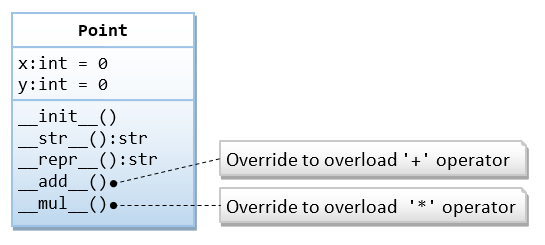
In this example, we shall define a Point class, which models a 2D point with x and y coordinates. We shall also overload
the operators '+' and '*' by overriding the so-called magic methods __add__() and __mul__().
"""
point.py: The point module, which defines the Point class
"""

class Point:    # In Python 2, use: class Point(object):
    """A Point instance models a 2D point with x and y coordinates"""

    def __init__(self, x = 0, y = 0):
        """Initializer, which creates the instance variables x and y with default of (0, 0)"""
        self.x = x
        self.y = y

    def __str__(self):
        """Return a descriptive string for this instance"""
        return '({}, {})'.format(self.x, self.y)

    def __repr__(self):
        """Return a command string to re-create this instance"""
        return 'Point(x={}, y={})'.format(self.x, self.y)

    def __add__(self, right):
        """Override the '+' operator: create and return a new instance"""
        p = Point(self.x + right.x, self.y + right.y)
        return p

    def __mul__(self, factor):
        """Override the '*' operator: modify and return this instance"""
        self.x *= factor
        self.y *= factor
        return self

# Test
if __name__ == '__main__':
    p1 = Point()
    print(p1)      # (0.00, 0.00)
    p1.x = 5
    p1.y = 6
    print(p1)      # (5.00, 6.00)
    p2 = Point(3, 4)
    print(p2)      # (3.00, 4.00)
    print(p1 + p2) # (8.00, 10.00) Same as p1.__add__(p2)
    print(p1)      # (5.00, 6.00) No change
    print(p2 * 3)  # (9.00, 12.00) Same as p1.__mul__(p2)
    print(p2)      # (9.00, 12.00) Changed
(0, 0)
(5, 6)
(3, 4)
(8, 10)
(5, 6)
(9, 12)
(9, 12)
1.2.4.1. How It Works?#
Python supports operator overloading. You can overload
'+','-','*','/','//'and'%'by overriding member methods__add__(),__sub__(),__mul__(),__truediv__(),__floordiv__()and__mod__(), respectively. You can overload other operators too.In this example, the
__add__()returns a new instance; whereas the__mul__()multiplies into this instance and returns this instance.
1.2.4.2. The getattr(), setattr(), hasattr() and delattr() Built-in Functions#
You can access an object’s attribute via the dot operator by hard-coding the attribute name, provided you know the attribute name in compile time.
For example, you can use:
obj_name.attr_name: to read an attribute
obj_name.attr_name = value: to write value to an attribute
del obj_name.attr_name: to delete an attribute
Alternatively, you can use built-in functions like getattr(), setattr(), delattr(), hasattr(), by using a variable
to hold an attribute name, which will be bound during runtime.
hasattr(obj_name, attr_name): returns
Trueif theobj_namecontains the_atr_name_.getattr(obj_name, attr_name[, default]): returns the value of the
_attr_name_of the_obj_name_, equivalent to_obj_name_._attr_name_. If the_attr_name_does not exist, it returns the_default_if present; otherwise, it raisesAttributeError.setattr(obj_name, attr_name, attr_value): sets a value to the attribute, equivalent to
_obj_name_._attr_name_ = _value_.delattr(obj_name, attr_name): deletes the named attribute, equivalent to
del _obj_name_._attr_name_.
1.2.4.3. Class Variable vs. Instance Variables#
Class variables are shared by all the instances, whereas instance variables are specific to that particular instance.
class MyClass:
    count = 0  # Total number of instances
               # A class variable shared by all the instances

    def __init__(self):
        # Update class variable
        self.__class__.count += 1   # Increment count
                                    # or MyClass.count += 1
        # Create instance variable: an 'id' of the instance in running numbers
        self.id = self.__class__.count

    def get_id(self):
        return self.id

    def get_count(self):
        return self.__class__.count

if __name__ == '__main__':
    print(MyClass.count)                #0

    myinstance1 = MyClass()
    print(MyClass.count)                #1
    print(myinstance1.get_id())         #1
    print(myinstance1.get_count())      #1
    print(myinstance1.__class__.count)  #1

    myinstance2 = MyClass()
    print(MyClass.count)                #2
    print(myinstance1.get_id())         #1
    print(myinstance1.get_count())      #2
    print(myinstance1.__class__.count)  #2
    print(myinstance2.get_id())         #2
    print(myinstance2.get_count())      #2
    print(myinstance2.__class__.count)  #2
0
1
1
1
1
2
1
2
2
2
2
2
Note
Python does not support access control. In other words, all attributes are “public” and are accessible by ALL.
However, by convention:
Names begin with an underscore
_are meant for internal use, and are not recommended to be accessed outside the class definition.Names begin with double underscores
__and not end with double underscores are further hidden from direct access through name mangling (or rename).Names begin and end with double underscores (such as
__init__,__str__,__add__) are special magic methods.
Example:
class MyClass:
    def __init__(self):
        self.myvar = 1       # public
        self._myvar = 2      # meant for internal use (private). 'Please' don't access directly
        self.__myvar = 3     # name mangling
        self.__myvar_ = 4    # name mangling
        self.__myvar__ = 5   # magic attribute

    def print(self):
        # All variables can be used within the class definition
        print(self.myvar)
        print(self._myvar)
        print(self.__myvar)
        print(self.__myvar_)
        print(self.__myvar__)

if __name__ == '__main__':
    myinstance1 = MyClass()
    print(myinstance1.myvar)
    print(myinstance1._myvar)
    # Variables beginning with __ are not accessible outside the class except those ending with __
    #print(myinstance1.__myvar)    # AttributeError
    #print(myinstance1.__myvar_)   # AttributeError
    print(myinstance1.__myvar__)

    myinstance1.print()

    print(dir(myinstance1))
1
2
5
1
2
3
4
5
['_MyClass__myvar', '_MyClass__myvar_', '__class__', '__delattr__', '__dict__', '__dir__', '__doc__', '__eq__', '__format__', '__ge__', '__getattribute__', '__getstate__', '__gt__', '__hash__', '__init__', '__init_subclass__', '__le__', '__lt__', '__module__', '__myvar__', '__ne__', '__new__', '__reduce__', '__reduce_ex__', '__repr__', '__setattr__', '__sizeof__', '__str__', '__subclasshook__', '__weakref__', '_myvar', 'myvar', 'print']
1.2.5. Example 3: Class Circle with get set methods (get_set.py)#
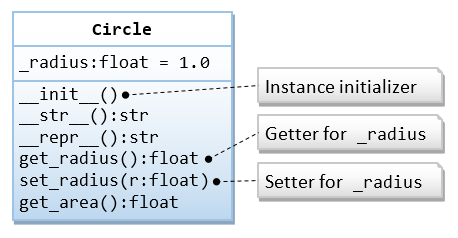
In this example, we shall rewrite the Circle class to access the instance variable via the getter and setter. We shall
rename the instance variable to _radius (meant for internal use only or private), with “public” getter get_radius()
and setter set_radius(), as follows:
"""circle.py: The circle module, which defines the Circle class"""
from math import pi

class Circle:
    """A Circle instance models a circle with a radius"""

    def __init__(self, _radius = 1.0):
        """Initializer with default radius of 1.0"""
        # Change from radius to _radius (meant for internal use)
        # You should access through the getter and setter.
        self.set_radius(_radius)   # Call setter

    def set_radius(self, _radius):
        """Setter for instance variable radius with input validation"""
        if _radius < 0:
            raise ValueError('Radius shall be non-negative')
        self._radius = _radius

    def get_radius(self):
        """Getter for instance variable radius"""
        return self._radius

    def get_area(self):
        """Return the area of this Circle instance"""
        return self.get_radius() * self.get_radius() * pi  # Call getter

    def __repr__(self):
        """Return a command string to recreate this instance"""
        # Used by str() too as __str__() is not defined
        return 'Circle(radius={})'.format(self.get_radius())  # Call getter

if __name__ == '__main__':
    c1 = Circle(1.2)        # Constructor and Initializer
    print(c1)               # Invoke __repr__(). Output: Circle(radius=1.200000)
    print(vars(c1))         # Output: {'_radius': 1.2}
    print(c1.get_area())    # Output: 4.52389342117
    print(c1.get_radius())  # Run Getter. Output: 1.2
    c1.set_radius(3.4)      # Test Setter
    print(c1)               # Output: Circle(radius=3.400000)
    c1._radius = 5.6        # Access instance variable directly (NOT recommended but permitted)
    print(c1)               # Output: Circle(radius=5.600000)

    c2 = Circle()  # Default radius
    print(c2)      # Output: Circle(radius=1.000000)

#    c3 = Circle(-5.6)  # ValueError: Radius shall be non-negative
Circle(radius=1.2)
{'_radius': 1.2}
4.523893421169302
1.2
Circle(radius=3.4)
Circle(radius=5.6)
Circle(radius=1.0)
1.2.5.1. How It Works?#
We rewrite the
Circleclass with “public” getter/setter. This is often done because the getter and setter need to carry out certain processing, such as data conversion in getter, or input validation in setter.We renamed the instance variable
_radius, with a leading underscore to denote it “private” (but it is still accessible to all). According to Python naming convention, names beginning with a underscore are to be treated as “private”, i.e., it shall not be used outside the class. We named our “public” getter and setterget_radius()andset_radius(), respectively.In the constructor, we invoke the setter to set the instance variable, instead of assign directly, as the setter may perform tasks like input validation. Similarly, we use the getter in
get_area()and__repr__().
1.2.6. Magic Methods#
A magic method is an object’s member methods that begins and ends with double underscore, e.g., __init__(), __str__(),
__repr__(), __add__(), __len__().
In Python, built-in operators and functions invoke the corresponding magic methods. For example, operator '+' invokes
__add__(), built-in function len() invokes __len__(). Even though the magic methods are invoked implicitly via
built-in operators and functions, you can also call them explicitly, e.g., 'abc'.__len__() is the same as len('abc').
The following table summarizes the commonly-used magic methods and their invocation.
Magic Method |
Invoked Via |
Invocation Syntax |
|---|---|---|
lt(self, right) |
Comparison Operators |
self < right |
add(self, right) |
Arithmetic Operators |
self + right |
and(self, right) |
Bitwise Operators |
self & right |
str(self) |
Built-in Function Call |
str(self), print(self) |
len(self) |
Sequence Operators & Built-in Functions |
len(self) |
int(self) |
Type Conversion Built-in Function Call |
int(self) |
init(self, *args) |
Constructor / Initializer |
x = ClassName(*args) |
del(self) |
Operator del |
del x |
index(self) |
Convert this object to an index |
x[self] |
radd(self, left) |
RHS (Reflected) addition, subtraction, etc. |
left + self |
iadd(self, right) |
In-place addition, subtraction, etc |
self += right |
pos(self) |
Unary Positive and Negate operators |
+self |
round(self) |
Function Call |
round(self) |
getattr(self, name) |
Object’s attributes |
|
call(self, *args, **kwargs) |
Callable Object |
obj(*args, **kwargs); |
enter(self), exit(self) |
Context Manager with-statement |
|
1.2.6.1. Operator Overloading#
Python supports operators overloading via overriding the corresponding magic functions.
1.2.7. Example 4: Circle with operator overloading (operator_overload.py)#
To Override the '==' operator for the Circle class:
class Circle:
    def __init__(self, radius):
        self.radius = radius

    def __eq__(self, right):
        """Override operator '==' to compare the two radius"""
        if self.__class__.__name__ == right.__class__.__name__:
            return self.radius == right.radius
        raise TypeError("not a 'Circle' object")

if __name__ == '__main__':
    print(Circle(8) == Circle(8))   # True
    print(Circle(8) == Circle(88))  # False
#    print(Circle(8) == 'abc')       # TypeError
True
False
1.3. Inheritance and Polymorphism#
1.3.1. Example 5: The Cylinder class as a subclass of Circle class (cylinder.py)#
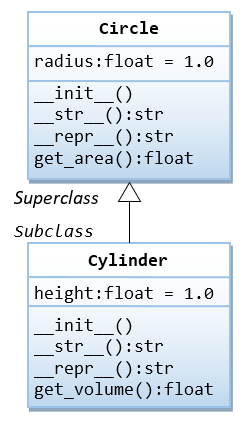
In this example, we shall define a Cylinder class, as a subclass of Circle. The Cylinder class shall inherit attributes
radius and get_area() from the superclass Circle, and add its own attributes height and get_volume().
from circle import Circle  # Using the Circle class in the circle module

class Cylinder(Circle):
    """The Cylinder class is a subclass of Circle"""

    def __init__(self, radius = 1.0, height = 1.0):
        """Constructor"""
        super().__init__(radius)  # Invoke superclass' constructor (Python 3)
            # OR
            # super(Cylinder, self).__init__(radius)   (Python 2)
            # Circle.__init__(self, radius)            Explicit superclass class
        self.height = height

    def __str__(self):
        """Self Description for print()"""
        # If __str__ is missing in the subclass, print() will invoke the superclass version!
        return 'Cylinder(radius=%.2f,height=%.2f)' % (self.radius, self.height)

    def get_volume(self):
        """Return the volume of the cylinder"""
        return self.get_area() * self.height  # Inherited get_area()

# For testing
if __name__ == '__main__':
    cy1 = Cylinder(1.1, 2.2)  # Output: Cylinder(radius=1.10,height=2.20)
    print(cy1)
    print(cy1.get_area())     # Use inherited superclass' method
    print(cy1.get_volume())   # Invoke its method

    cy2 = Cylinder()          # Default radius and height
    print(cy2)                # Output: Cylinder(radius=1.00,height=1.00)
    print(cy2.get_area())
    print(cy2.get_volume())

    print(dir(cy1))
        # ['get_area', 'get_volume', 'height', 'radius', ...]
    print(Cylinder.get_area)
        #
        # Inherited from the superclass
    print(Circle.get_area)
        #

    c1 = Circle(3.3)
    print(c1)    # Output: This is a circle with radius of 3.30

    print(issubclass(Cylinder, Circle))  # True
    print(issubclass(Circle, Cylinder))  # False
    print(isinstance(cy1, Cylinder))     # True
    print(isinstance(cy1, Circle))       # True (A subclass object is also a superclass object)
    print(isinstance(c1, Circle))        # True
    print(isinstance(c1, Cylinder))      # False (A superclass object is NOT a subclass object)
    print(Cylinder.__base__)             # Show superclass:
    print(Circle.__subclasses__())       # Show a list of subclasses: []
Cylinder(radius=1.10,height=2.20)
3.8013271108436504
8.362919643856031
Cylinder(radius=1.00,height=1.00)
3.141592653589793
3.141592653589793
['__class__', '__delattr__', '__dict__', '__dir__', '__doc__', '__eq__', '__format__', '__ge__', '__getattribute__', '__getstate__', '__gt__', '__hash__', '__init__', '__init_subclass__', '__le__', '__lt__', '__module__', '__ne__', '__new__', '__reduce__', '__reduce_ex__', '__repr__', '__setattr__', '__sizeof__', '__str__', '__subclasshook__', '__weakref__', 'get_area', 'get_volume', 'height', 'radius']
<function Circle.get_area at 0x000002DE8B4CBEC0>
<function Circle.get_area at 0x000002DE8B4CBEC0>
This is a circle with radius of 3.30
True
False
True
True
True
False
<class 'circle.Circle'>
[<class '__main__.Cylinder'>]
1.3.1.1. How It Works?#
When you construct a new instance of
Cylindervia:
cy1 = Cylinder(1.1, 2.2)
Python first creates a plain Cylinder object and invokes the Cylinder’s __init__() with self binds to the
newly created cy1, as follows:
Cylinder.__init__(cy1, 1.1, 2.2)
Inside the __init__(), the super().__init__(radius) invokes the superclass’ __init__(). This creates a superclass
instance with radius. The next statement self.height = height creates the instance variable height for cy1.
Take note that Python does not call the superclass' constructor automatically.
If
__str__()or__repr__()is missing in the subclass,str()andrepr()will invoke the superclass version.
1.3.1.2. super()#
There are two ways to invoke a superclass method:
via explicit classname: e.g.,
Circle.__init__(self)
Circle.get_area(self)
via
super(): e.g.,
super().__init__(radius)
super().get_area()
The super() method returns a proxy object that delegates method calls to a parent or sibling class. This is useful for
accessing inherited methods that have been overridden in a class.
1.3.1.3. Example 6: Method Overriding#
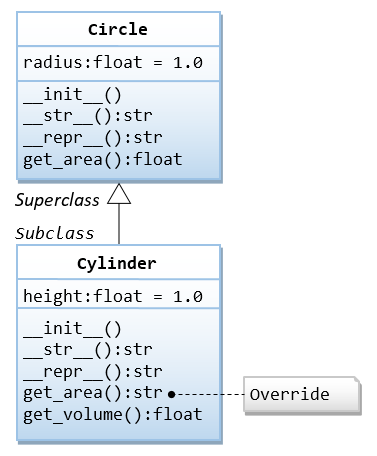
In this example, we shall override the get_area() method to return the surface area of the cylinder. We also rewrite
the __str__() method, which also overrides the inherited method. We need to rewrite the get_volume() to use the
superclass’ get_area(), instead of this class.
"""cylinder.py: The cylinder module, which defines the Cylinder class"""
from math import pi
from circle import Circle  # Using the Circle class in the circle module

class Cylinder(Circle):
    """The Cylinder class is a subclass of Circle"""

    def __init__(self, radius = 1.0, height = 1.0):
        """Initializer"""
        super().__init__(radius)  # Invoke superclass' initializer
        self.height = height

    def __str__(self):
        """Self Description for print() and str()"""
        return 'Cylinder({}, height={})'.format(super().__repr__(), self.height)
                # Use superclass' __repr__()

    def __repr__(self):
        """Formal Description for repr()"""
        return self.__str__()   # re-direct to __str__() (not recommended)

    # Override
    def get_area(self):
        """Return the surface area the cylinder"""
        return 2.0 * pi * self.radius * self.height

    def get_volume(self):
        """Return the volume of the cylinder"""
        return super().get_area() * self.height  # Use superclass' get_area()

# For testing
if __name__ == '__main__':
    cy1 = Cylinder(1.1, 2.2)
    print(cy1)              # Invoke __str__(): Cylinder(Circle(radius=1.1), height=2.2)
    print(cy1.get_area())   # Invoke overridden version
    print(cy1.get_volume()) # Invoke its method
    print(cy1.radius)
    print(cy1.height)
    print(str(cy1))         # Invoke __str__()
    print(repr(cy1))        # Invoke __repr__()

    cy2 = Cylinder()        # Default radius and height
    print(cy2)              # Invoke __str__(): Cylinder(Circle(radius=1.0), height=1.0)
    print(cy2.get_area())
    print(cy2.get_volume())

    print(dir(cy1))
    print(Cylinder.get_area)
    print(Circle.get_area)
Cylinder(Circle(radius=1.100000), height=2.2)
15.205308443374602
8.362919643856031
1.1
2.2
Cylinder(Circle(radius=1.100000), height=2.2)
Cylinder(Circle(radius=1.100000), height=2.2)
Cylinder(Circle(radius=1.000000), height=1.0)
6.283185307179586
3.141592653589793
['__class__', '__delattr__', '__dict__', '__dir__', '__doc__', '__eq__', '__format__', '__ge__', '__getattribute__', '__getstate__', '__gt__', '__hash__', '__init__', '__init_subclass__', '__le__', '__lt__', '__module__', '__ne__', '__new__', '__reduce__', '__reduce_ex__', '__repr__', '__setattr__', '__sizeof__', '__str__', '__subclasshook__', '__weakref__', 'get_area', 'get_volume', 'height', 'radius']
<function Cylinder.get_area at 0x000002DE8B5384A0>
<function Circle.get_area at 0x000002DE8B4CBEC0>
In Python, the overridden version replaces the inherited version.
To access superclass’ version of a method, use:
super()._method_name_(*_args_), e.g.,super().get_area()Explicitly via the class name:
_superclass_._method-name_(self, *_args_), e.g.,Circle.get_area(self)
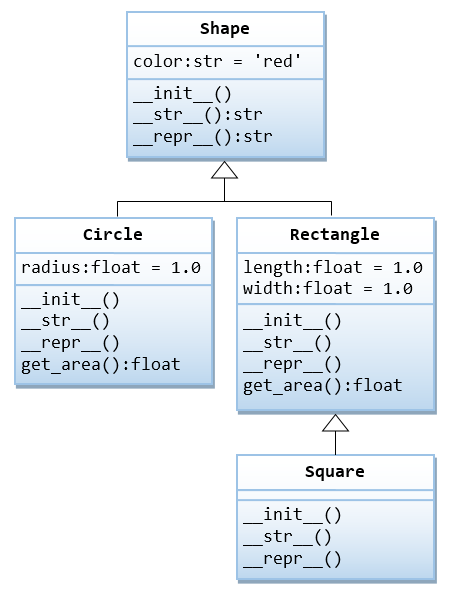
1.3.2. Example 7: Shape and its subclasses#
from math import pi

class Shape:
    """The superclass Shape with a color"""
    def __init__(self, color = 'red'):  # Constructor
        self.color = color
    def __str__(self):  # For print() and str()
        return 'Shape(color=%s)' % self.color

class Circle(Shape):
    """The Circle class: a subclass of Shape with a radius"""
    def __init__(self, radius = 1.0, color = 'red'):  # Constructor
        super().__init__(color)
        self.radius = radius
    def __str__(self):  # For print() and str()
        return 'Circle(%s, radius=%.2f)' % (super().__str__(), self.radius)
    def get_area(self):
        return self.radius * self.radius * pi

class Rectangle(Shape):
    """The Rectangle class: a subclass of Shape wit a length and width"""
    def __init__(self, length = 1.0, width = 1.0, color = 'red'):  # Constructor
        super().__init__(color)
        self.length = length
        self.width = width
    def __str__(self):  # For print() and str()
        return 'Rectangle(%s, length=%.2f, width=%.2f)' % (super().__str__(), self.length, self.width)
    def get_area(self):
        return self.length * self.width

class Square(Rectangle):
    """The Square class: a subclass of Rectangle having the same length and width"""
    def __init__(self, side = 1.0, color = 'red'):  # Constructor
        super().__init__(side, side, color)
    def __str__(self):  # For print() and str()
        return 'Square(%s)' % super().__str__()

# For Testing
if __name__ == '__main__':
    s1 = Shape('orange')
    print(s1)                # Shape(color=orange)
    print(s1.color)

    c1 = Circle(1.2, 'orange')
    print(c1)                # Circle(Shape(color=orange), radius=1.20)
    print(c1.get_area())

    r1 = Rectangle(1.2, 3.4, 'orange')
    print(r1)                # Rectangle(Shape(color=orange), length=1.20, width=3.40)
    print(r1.get_area())

    sq1 = Square(5.6, 'orange')
    print(sq1)               # Square(Rectangle(Shape(color=orange), length=5.60, width=5.60))
    print(sq1.get_area())
Shape(color=orange)
orange
Circle(Shape(color=orange), radius=1.20)
4.523893421169302
Rectangle(Shape(color=orange), length=1.20, width=3.40)
4.08
Square(Rectangle(Shape(color=orange), length=5.60, width=5.60))
31.359999999999996
1.3.3. Multiple Inheritance#
Python supports multiple inheritance, which is defined in the form of “class _class_name_(_base_class__1, _base_class__2,...):”.
1.3.3.1. Diamond Problem#
Suppose that two classes B and C inherit from a superclass A, and D inherits from both B and C. If A has a method
called m(), and m() is overridden by B and/or C, then which version of m() is inherited by D?
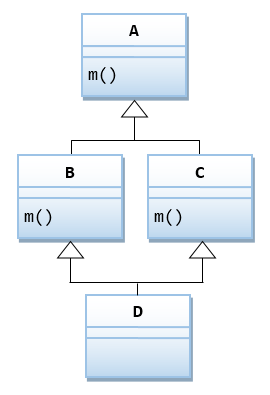
Let’s look at Python’s implementation.
1.3.3.1.1. Example 1#
class A:
    def m(self):
        print('in Class A')

class B(A):
    def m(self):
        print('in Class B')

class C(A):
    def m(self):
        print('in Class C')

# Inherits from B, then C. It does not override m()
class D1(B, C):
    pass

# Different order of subclass list
class D2(C, B):
    pass

# Override m()
class D3(B, C):
    def m(self):
        print('in Class D3')

if __name__ == '__main__':
    x = D1()
    x.m()   # 'in Class B' (first in subclass list)

    x = D2()
    x.m()   # 'in Class C' (first in subclass list)

    x = D3()
    x.m()   # 'in Class D3' (overridden version)
in Class B
in Class C
in Class D3
1.3.3.1.2. Example 2#
Suppose the overridden m() in B and C invoke A’s m() explicitly.
class A:
    def m(self):
        print('in Class A')

class B(A):
    def m(self):
        A.m(self)
        print('in Class B')

class C(A):
    def m(self):
        A.m(self)
        print('in Class C')

class D(B, C):
    def m(self):
        B.m(self)
        C.m(self)
        print('in Class D')

if __name__ == '__main__':
    x = D()
    x.m()
in Class A
in Class B
in Class A
in Class C
in Class D
1.3.3.1.3. Example 3 Using super()#
class A:
    def m(self):
        print('in Class A')

class B(A):
    def m(self):
        super().m()
        print('in Class B')

class C(A):
    def m(self):
        super().m()
        print('in Class C')

class D(B, C):
    def m(self):
        super().m()
        print('in Class D')

if __name__ == '__main__':
    x = D()
    x.m()
in Class A
in Class C
in Class B
in Class D
With super(), A’s m() is only run once. This is because super() uses the so-called Method Resolution Order (MRO) to linearize the superclass. Hence, super() is strongly recommended for multiple inheritance, instead of explicit class call.
1.3.3.1.4. Example 4 Let’s look at init()#
class A:
    def __init__(self):
        print('init A')

class B(A):
    def __init__(self):
        super().__init__()
        print('init B')

class C(A):
    def __init__(self):
        super().__init__()
        print('init C')

class D(B, C):
    def __init__(self):
        super().__init__()
        print('init D')

if __name__ == '__main__':
    d = D()
    # init A
    # init C
    # init B
    # init D

    c = C()
    # init A
    # init C

    b = B()
    # init A
    # init B
init A
init C
init B
init D
init A
init C
init A
init B
Each superclass is initialized exactly once, as desired.
1.3.4. Example 8: Electric potencial at a point#
Write a class Charge for calculation of electric potential at a point due to a given charged particle. The method uses Coulomb’s law in two-dimensional model, so the electric potential at a point due to a given charged particle is represented by \(V = kq/r\), where \(q\) is the charge value, r is the distance from the point to the charge, and \(k = 8.99 × 10^{9} N m^2/C^2\) is the electrostatic constant, or Coulomb’s constant. Using SI (Systeme International d’Unites) in this formula, N designates newtons (force), m designates meters (distance), and C represent coulombs (electric charge). When there are multiple charged particles, the electric potential at any point is the sum of the potentials due to each charge.
#-----------------------------------------------------------------------
# charge.py
#-----------------------------------------------------------------------
import sys
import math
#-----------------------------------------------------------------------

class Charge:

    # Construct self centered at (x, y) with charge q.
    def __init__(self, x0, y0, q0):
        self._rx = x0  # x value of the query point
        self._ry = y0  # y value of the query point
        self._q = q0   # Charge

    # Return the potential of self at (x, y).
    def potentialAt(self, x, y):
        COULOMB = 8.99e09
        dx = x - self._rx
        dy = y - self._ry
        r = math.sqrt(dx*dx + dy*dy)
        if r == 0.0: # Avoid division by 0
            if self._q >= 0.0:
                return float('inf')
            else:
                return float('-inf')
        return COULOMB * self._q / r

    # Return a string representation of self.
    def __str__(self):
        result = str(self._q) + ' at ('
        result += str(self._rx) + ', ' + str(self._ry) + ')'
        return result

#-----------------------------------------------------------------------

# For testing.
# Accept floats x and y as command-line arguments. Create a Charge
# objects with fixed position and electrical charge, and write to
# standard output the potential at (x, y) due to the charge.

def main():
    x = float(sys.argv[1])
    y = float(sys.argv[2])
    c = Charge(.51, .63, 21.3)
    print(c)
    print(c.potentialAt(x, y))

if __name__ == '__main__':
    main()
To run in Spyder use the next configuration: Ejecutar (Run) -> Configuración por archivo (Configuration per file) -> Ejecutar en una terminal de comandos del sistema (Execute in an external system terminal) -> Opciones de línea de comandos (Command line options).
Client that uses charge to calculate the potential due to several charges:
#-----------------
# chargeclient.py
#-----------------
import sys
from charge import Charge
# Acepta floats x e y como argumentos en la línea de comandos. Crea dos objetos
# Charge con posición y carga. Imprime el potencial en (x, y) en la salida estandard
x = float(sys.argv[1])
y = float(sys.argv[2])
c1 = Charge(.51, .63, 21.3)
c2 = Charge(.13, .94, 81.9)
v1 = c1.potentialAt(x, y)
v2 = c2.potentialAt(x, y)
print(f'potential at ({x:.2f}, {y:.2f}) due to')
print('  ' + str(c1) + ' and')
print('  ' + str(c2))
print(f'is {v1+v2:.3e}')
1.3.5. Example 8: Complex Numbers#
A complex number is a number of the form \(x + yi\), where x and y are real numbers and \(i\) is the square root of -1. The number \(x\) is known as the real part of the complex number, and the number \(y\) is known as the imaginary part.
Although Python provides a complex data type (with a lowercase c), complex class development (with a capital C) is presented.
The operations on complex numbers that are needed for basic computations are to add and multiply them by applying the commutative, associative, and distributive laws of algebra (along with the identity \(i^2 = -1\)); to compute the magnitude; and to extract the real and imaginary parts, according to the following equations:
Addition: \((x+yi) + (v+wi) = (x+v) + (y+w)i\)
Multiplication: \((x + yi) * (v + wi) = (xv - yw) + (yv + xw)i\)
Magnitude: \(|x + yi| = (x^{2}+y^{2})^{\frac{1}{2}}\)
Real part: \(Re(x + yi) = x\)
Imaginary part: \(Im(x + yi) = y\)
The API that specifies the data-type operations is:
Client operation |
Special method |
Description |
|---|---|---|
Complex(x,y) |
init(self,re,im) |
new Complex object with value x + yi |
a.re() |
real part of a |
|
a.im() |
imaginary part of a |
|
a + b |
add(self,other) |
sum of a and b |
a * b |
mul(self,other) |
product of a and b |
abs(a) |
abs(self) |
magnitud of a |
str(a) |
str(self) |
x + yi (string representation of a) |
#-----------------------------------------------------------------------
# complex.py
#-----------------------------------------------------------------------

import math

# A Complex object is a complex number.

# A Complex object is immutable.  So once you create and initialize
# a Complex object, you cannot change it.

class Complex:

    # Construct self with real part real and imaginary
    # part imag. real defaults to 0.0. imag also defaults to 0.0.
    def __init__(self, re=0.0, im=0.0):
        self._re = re
        self._im = im

    # Return the real part of self.
    def re(self):
        return self._re

    # Return the imaginary part of self.
    def im(self):
        return self._im

    # Return the conjugate of self.
    def conjugate(self):
        return Complex(self._re, -self._im)

    # Return a new Complex object which is the sum of self and
    # Complex object other.
    def __add__(self, other):
        re = self._re + other._re
        im = self._im + other._im
        return Complex(re, im)

    # Return a new Complex object which is the product of self and
    # Complex object other.
    def __mul__(self, other):
        re = self._re * other._re - self._im * other._im
        im = self._re * other._im + self._im * other._re
        return Complex(re, im)

    # Return True if self and Complex object other are equal, and
    # False otherwise.
    def __eq__(self, other):
        return (self._re == other._re) and (self._im == other._im)

    # Return True if self and Complex object other are unequal, and
    # False otherwise.
    def __ne__(self, other):
        return not self.__eq__(other)

    # Return the absolute value of self.
    def __abs__(self):
        return math.sqrt(self._re*self._re + self._im*self._im)
        # Alternative: return math.hypot(self._re, self._im)
        # Alternative: return self.__mul__(self.conjugate())

    # Return a string representation of self.
    def __str__(self):
        return str(self._re) + ' + ' + str(self._im) + 'i'

#-----------------------------------------------------------------------

# For testing.
# Create and use some Complex objects.

def main():
    z0 = Complex(1.0, 1.0)
    z = z0
    z = z * z + z0
    z = z * z + z0
    print(z)

if __name__ == '__main__':
    main()
-7.0 + 7.0i
References: